![EnvoyMedical-Blue (2).svg]](https://www.envoymedical.com/hubfs/EnvoyMedical-Blue%20(2).svg)
You must use your Personal Programmer on occasion to monitor whether the battery is depleting. You will not know the battery is in depletion if you do not use the Programmer.
Each time you use your programmer to adjust profiles, change volume settings, or query the device you automatically interrogate your device.
If you notice changes in sound or performance it's a good idea to check your battery.
When the Esteem battery inside the Sound Processor begins to deplete it triggers 2 indicators:
- The Confirmation Tone, which is audible when you adjust profiles, change volume settings, or query the device, will transition from a single tone to a double tone.
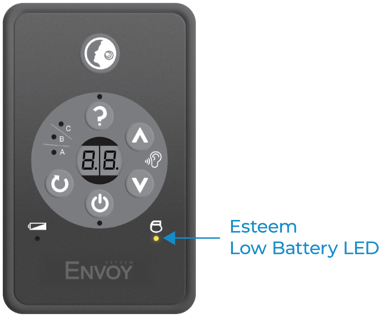
- The Esteem Low Battery LED (shown below) will illuminate when you use your programmer.
If you think your battery is depleting contact Envoy Medical Customer Service at 800-460-7531 or email us at customerservice@envoymedical.com
We can help you locate the closest surgical site in your area.
While the battery will slowly deplete over a 2-4 week period, you will no longer be able to hear when the device is completely depleted, so you want to contact us and get in touch with the site.